What To Do If Your Wallet Has Been Compromised
Last updated: November 24, 2026
This guide will walk you through exactly what to do, step by step.
Step 1: Stop Using the Compromised Wallet Immediately
Do not send any more funds to the wallet. Any interaction could trigger bots or scripts that auto-drain your balance.
• If you still have funds in the wallet, you can try bridging or transferring them out quickly — but act fast and expect the attacker to be watching.
• Avoid using this wallet for any future swaps, bridges, or dApp interactions.
Step 2: Confirm It’s a Full Compromise
This is not an approval issue. This is someone else sending funds from your wallet, which requires private key access.
Key signs:
• ETH or tokens sent without you signing or approving anything
• Transfers show up as simple Transfer transactions (not contract calls)
• Funds leave immediately after arriving
In this example:
Funds IN (green) — funds sent to the wallet (via Relay, in this case)
Funds OUT (orange) — sent out from the wallet (via 3rd party with wallet access, in this case)
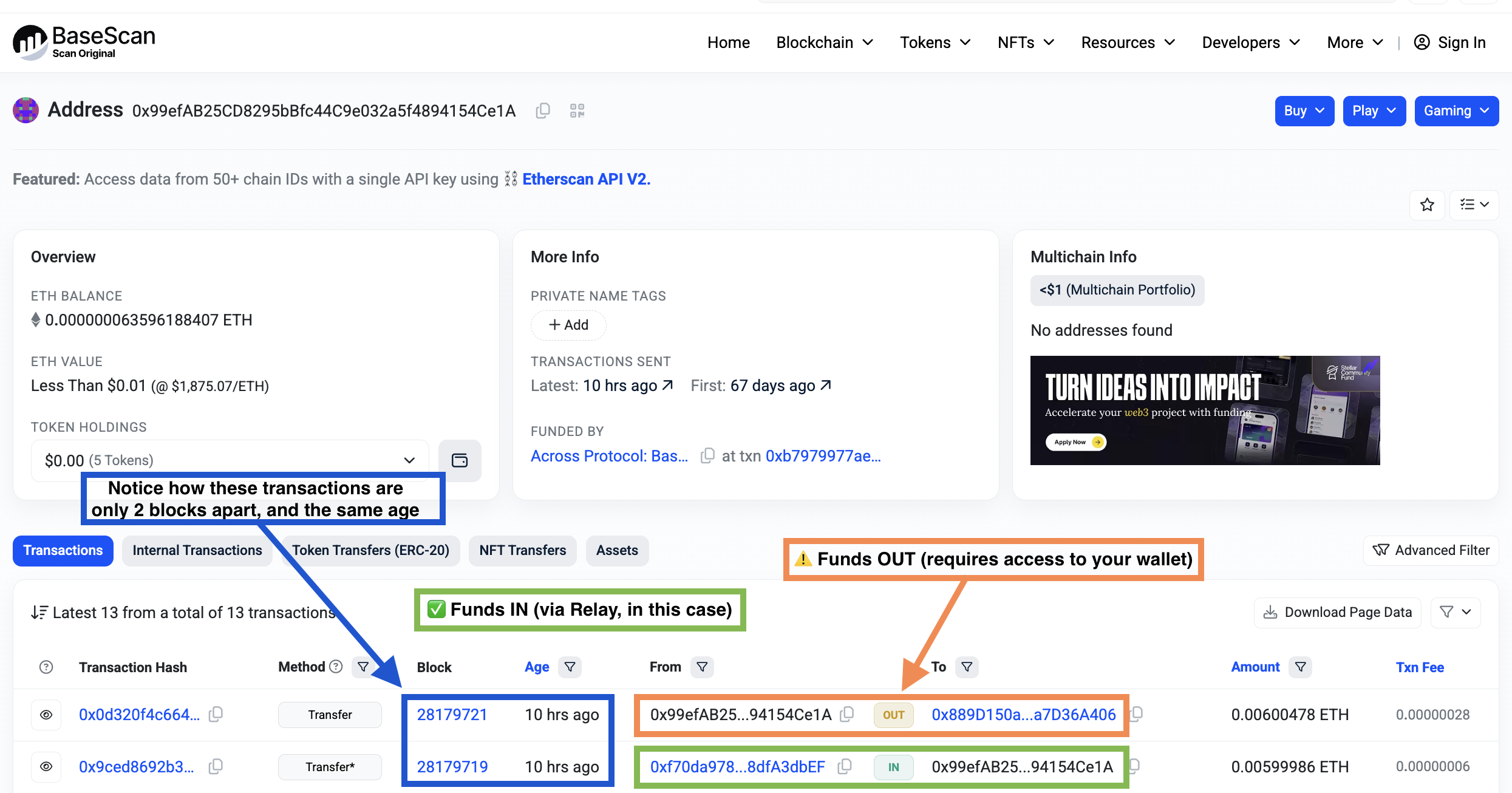
If you didn’t send this transaction, it’s a strong sign your wallet has been compromised.
Step 3: Create a New Wallet Immediately
• Use a trusted wallet provider
• Generate a completely new wallet
• Back up your seed phrase offline only — not in notes apps, screenshots, or cloud services
• Don’t import this wallet into untrusted browser extensions or platforms
Step 4: Secure Your Device
It’s possible your device was compromised via malware, a phishing site, or a fake extension.
• Run a full antivirus or anti-malware scan
• Remove suspicious or untrusted browser extensions
• Be extra careful with links from Discord, Twitter, or airdrop claim pages
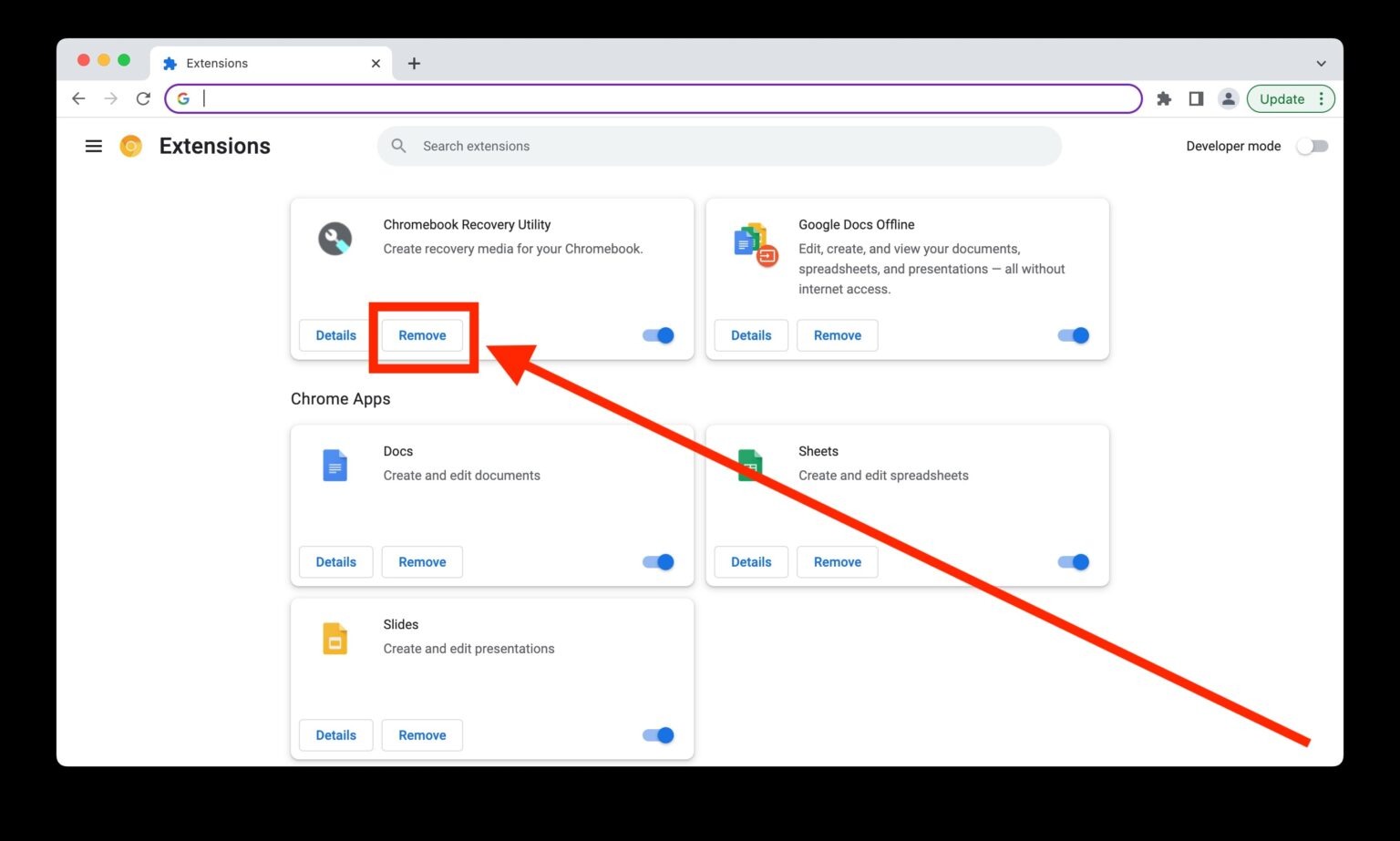
Delete any extensions you don’t remember installing or didn’t intentionally add.
Step 5: Recover Any Remaining Assets
If any tokens or ETH remain:
• Transfer them immediately to your new wallet
• Revoke token approvals using a trusted approval-revocation tool to prevent unauthorized access to your funds.
• Use a high gas fee to reduce the chance of being front-run
• Carefully review and remove suspicious token approvals granted to unknown or untrusted contracts.
• Batch assets together if possible to reduce fees and delays
Step 6: Ask Yourself What Might Have Happened
Consider the following:
• Did you ever paste your seed phrase into a website?
• Download an airdrop tool or wallet from an unofficial source?
• Import your wallet into a sketchy dApp or extension?
• Clicked a link in Discord, Twitter, or Telegram?
Even if you’re unsure — it’s worth changing behavior now to protect future funds.
Step 7: Strengthen Your Wallet Security Going Forward
To avoid future issues:
• Use a hardware wallet like Ledger or Trezor for storage
• Split funds across:
• A hot wallet for daily activity (bridging/swapping)
• A cold wallet for savings
Step 8: Report your Compromise
Report to Chainabuse here. Chainabuse is a public database of scam addresses and fraudulent activity. Filing a report helps flag the attacker's addresses across wallets, exchanges, and security tools — making it harder for them to move or cash out stolen funds, and warning others before they become victims too.
Still Not Sure If You’re Compromised?
If you’re unsure — but something feels off — it’s better to act early than lose more later.
Setting up a new wallet and securing your device only takes a few minutes — and could prevent a much larger loss.
It’s a small investment of time for major peace of mind.
If you’d like help reviewing your wallet activity or need guidance on next steps, reach out anytime.
Wallet Compromise Recovery Checklist
Make sure you’ve covered the essentials:
[ ] Stopped using the compromised wallet
[ ] Checked for unauthorized transfers on a block explorer
[ ] Created a brand new wallet
[ ] Stored your new seed phrase securely (offline!)
[ ] Scanned your device for malware or suspicious extensions
[ ] Moved remaining funds to your new wallet
[ ] Reflected on what might have caused the compromise
[ ] Set up stronger wallet security (cold vs hot wallet split)
[ ] Reached out to support if you need help reviewing activity
Even if you’re unsure, completing this checklist takes just a few minutes — and could prevent much bigger losses later.